Micro-FT8 · FT8/FT4 for QMX and QDX · Early pre-release
An FT8 station that keeps working when you put your phone away.
Micro-FT8 is a 35 gram station that sits next to your QMX or QDX and runs FT8
on its own: it decodes, calls CQ, works callers, and logs. Your phone is only
a wireless remote. Use it to set up and check in, then pocket
it. The station keeps going.
Getting started
Downloads
Set up a station, or get the firmware for the PoE-P4 and
the Atom. Or watch the walkthrough.
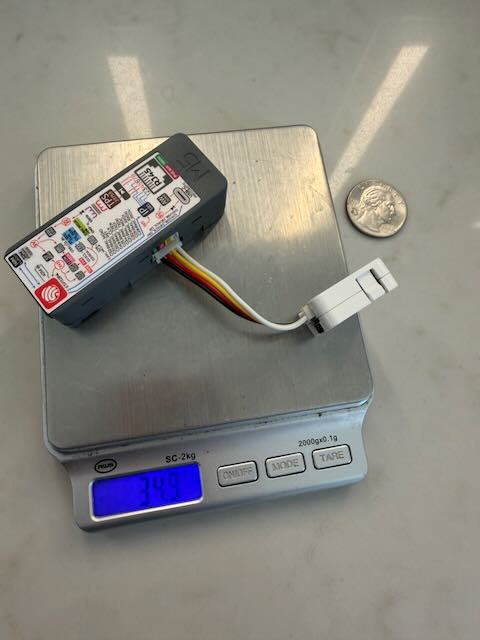 PoE-P4 + AtomS3 Lite — the whole compute stack is
35 grams (34.9 g on the scale). Quarter for scale.
Watch it work
A walkthrough of Micro-FT8 in use. It is hosted on YouTube, which loads its own
player (privacy-enhanced mode) when this page does;
open it on YouTube instead if you
would rather not.
Why Micro-FT8
The station runs itself
Decoding, calling CQ, and the auto-sequencer all run on the station, not
on the phone. Close the page, lock the screen, or switch apps, and it keeps
calling CQ and working the stations that answer.
Nothing on the summit needs a network
The Atom runs its own Wi‑Fi, so you don’t need a router, cell signal, or
app store. The map is served by the station, so it works offline. The clock
syncs from your browser, so the GPS can stay home. The one network step is
the first install: the app is downloaded once, through your phone, then lives
on the Atom.
Join its network, open micro-ft8.local or 192.168.4.1:
Getting started.
35 grams, about $29
The station is two stock M5Stack parts with no screen and no keyboard.
34.9 g on the scale. Real FT8 QSOs completed.
Your phone stays yours
The phone isn’t the station, so its battery, screen, and apps stay free for
navigation, spotting, or a call home. If the phone dies, the station keeps
operating.
Any browser works: phone, tablet, or laptop.
How it’s different
There are three common ways to run FT8 without a laptop. Each one makes a
different trade-off.
|
Phone app + radio |
Radio with built-in FT8 |
Micro-FT8 + radio |
| Where FT8 runs |
On the phone |
Inside the radio |
On a small station beside the radio |
| When the phone sleeps |
Depends on the phone letting the app run in the background |
No phone involved |
Keeps operating; the phone is only a remote |
| Screen you operate on |
The phone |
The radio’s own screen |
Any browser, or none once it’s running |
| Radios |
Usually many |
That radio only |
QMX and QDX |
| What you add |
A USB cable |
A new radio |
35 g, about $29 |
If you want the most radio choices, use a phone app. If you want nothing extra
to carry, use a radio with built-in FT8. Micro-FT8 is for when you want your QMX
or QDX to keep working while you do something else.
How it runs
M5Stack Unit PoE-P4 as the radio host, an
AtomS3 Lite as the Wi‑Fi companion,
no keyboard and no screen. All of the compute fits in
35 grams. Set up and check in from a phone, tablet, or laptop;
no need to keep the page open. It has completed real FT8 QSOs on the air.
GPS is optional. Clock comes from the browser over the Atom link —
open the page, sync once, operate. No GNSS module required for time.
P4 USB-host FT8 wasn’t a leap of faith:
SteffenLav’s qmx-panadapter
already ships FT8 on ESP32-P4 (M5Stack Tab5) with a live QMX. That work proved the silicon;
Micro-FT8’s PoE-P4 build is the headless, browser-UI shape of the same idea.
Headless BOM (M5Stack)
The 35 g compute stack is two catalogue parts plus the Grove cable that ships with the
PoE-P4. Radio and power are separate.
| Part |
Role |
List |
|
Unit PoE-P4
(SKU U213)
|
Radio host — USB to QMX, decode, CAT. Includes a 20 cm Grove cable. |
$21.50 |
|
AtomS3 Lite
|
Wi‑Fi companion — serves the browser UI over the LAN. |
$7.50 |
| M5Stack compute BOM (list, excl. shipping) |
~$29 |
Prices from shop.m5stack.com (USD, checked
2026-09-18). Does not include QMX/QDX, USB-C power bank/cables, or phone.
In the browser
Join the Atom’s own Wi‑Fi network directly (no router needed — a summit has
no camp router any more than it has cell service), or put it on your home
or camp network instead. Either way: no app-store install, just Safari or
Chrome on a phone, tablet, or laptop. Three tabs: Operate drives
the radio, QSOs is your log, Tools is everything
around operating: who is hearing you (from PSKReporter, on the map or as a list), space
weather, the map, and an SWR sweep for tuning an antenna.
The phone is optional once you’re set up. Open the page again
at any time to see what the station worked while you were away.
Operate — CQ out, power/SWR live, decodes still flowing.
A caller answers — flagged → ME, queued, bearing & distance.
QSOs — grouped by day, ADI per day or all.
Tap a callsign — grid, log history, spots, QRZ.com.
Tools — space weather, and the way into the map.
Map — QSO paths, POTA/SOTA spots, grayline.
SWR sweep — tick the bands, run it, and see the whole curve. A 40 m
end-fed half-wave: low on 40, 20 and 15, high on 30 and 17, as it should be.
What it does
-
An SWR sweep for tuning an antenna in the field. Tick the bands
(the ones you’ve enabled are ticked for you), see how long it will take, and run
it: the station sends a short carrier at each point and plots SWR from 1 to 6
across every band you chose, with the band edges marked and the lowest point on
each band named. Adjust the wire, run it again, and your last run stays faintly
behind the new one. Stop ends it at once. Needs the PoE‑P4 and a QMX; set the
QMX’s Tune power to 25% or more for a true reading.
-
A full browser UI. Operate, queue, tune, and download logs from
Safari or Chrome. Tap any callsign to see its grid, bearing and distance, your
past QSOs with it, and a link to QRZ.com.
-
An offline map. It shows great-circle paths to every grid you’ve
worked, plus the grayline. With internet, it adds live POTA/SOTA spots and NOAA
space weather.
-
You can still operate while transmitting. The decode list stays
live, so you can queue the next QSO. Power and SWR are shown on screen.
-
A CQ calls as many times as you set, then stops. Stations that
answer are worked first, and every message in the queue goes out a set number of
times, which you can change on its row.
-
Logs are safer, and easier to get off the station. Download a
day’s
.adi file straight to your phone and upload it to whatever
logging software you use. Direct QRZ.com logging is coming soon. A QSO logs the
other station’s grid even when the exchange never carried one, from the last
grid it sent in the past four hours.
-
It never logs what didn’t go out. If the radio can’t be keyed when
your slot starts, nothing is sent, no try is used, and the message goes out in its
next slot once the radio is back. Stop ends a transmission on the air at once.
-
Plays well with an amplifier. Settings › Amplifier sets how long
the radio waits after keying before RF, and can recover from the QMX’s SWR
protection tripping on an amplifier’s first transmission on a new band.
What’s verified, and what isn’t yet
Here is what has been checked on the air, on real hardware, and what hasn’t.
Verified on the air
- Real FT8 QSOs on the headless PoE-P4 build.
-
The SWR sweep, on a PoE‑P4 with a QMX and a 40 m end-fed half-wave: 40, 20
and 15 m read 1.1 to 1.6, 30 and 17 m read above 2, as that antenna
should.
-
Signal reports on WSJT-X’s scale, checked on the air at a POTA activation. Against
WSJT-X’s own decoder on 984 recorded messages, 79% read within 3 dB of it.
Not yet, or not claimed
-
Decode sensitivity hasn’t been measured against WSJT-X or any
phone app. Micro-FT8 decodes with Karlis Goba’s
ft8_lib. We’ll publish numbers
once we’ve measured them.
-
QDX hasn’t been tried. The firmware has a QDX backend, but it has
never run against a real QDX; every QSO so far was with a QMX. KH1 isn’t supported.
-
Calling CQ a set number of times is new and hasn’t been checked
on the air yet.
-
Some of the newest browser features, such as the map on a real phone and
.local names on Android, are still waiting on field checks.
-
This is an early pre-release. We’re looking for feedback;
it isn’t a finished release yet.
Coming soon
-
Deeper decode — using more of the ESP32-P4’s headroom for better
recall on busy bands.
-
Per-band conditions — a band-by-band read alongside the space
weather numbers.
-
QRZ.com realtime logging — upload completed QSOs from the browser
with your own credentials (callsign links to QRZ are already in; this is the log-sync
half). The radio never holds those credentials.